Saturday, March 5, 2016

How to Register The Latest Twitterfeed


What it twitterfeed.? HOW do I list there.?

Twitterfeed is sort of the usual sites used by the blogging to share the article on the blog to social networks like facebook, twitter, linkdin, and some other social networks automatically.


The way the list is quite easy just needed Email is still active to register it, because in twitterfeed will use email as an ID to perform verification or confirmation twitterfeed account other issues. Here's how the list twitterfeed

1. Open twitterfeed site here
2. Click the sig-up on the right on the desktop
3. Fill in the email with your email that will be used to register,
    Enter your password, and your password konfir, CAPTA contents 
    in accordance with the text in the image CAPTA
4. Click Create Account to sign up

5. Next you will be required to perform verification on your twitterfeed 
    account through the verification link that has been sent to your email, 
    how open your EMAIL, and open a message that has been submitted 
    verification twitterfeed, click the link verifications.

6. And finish your twitterfeed account is ready to use to share it.


Oh yes, usually at the beginning of the verification you will be immediately taken to a page to create a feed, if you do not want to create a feed you can press censel to cenceled

so this tutorial on how to register twitterfeed hopefully be useful for my friend's 
Thank you....
Read-More → How to Register The Latest Twitterfeed

Graves With Barcode

Graves With Barcode
The modern cemetery may call it , because of the sophistication of this cemetery make the burial place is no longer synonymous with things mystical . Why is that ? This is due to the creation nissan barcode that has made ​​the tomb became a cemetery in makeup with today's technology.

Starting from a shape As a tribute to the people who had died a funeral director makes a unique case which provides barcode on nissan stone graves of those who have died , Barcode is placed in a tomb stone of people who had died .


Barcode placed on a tombstone to allow visitors to find out more about the people buried in the place Than When scanned with a smartphone , the square codes - known as Quick Response or QR codes - is launching a website which contains a biography of the deceased . page can include people's profiles , photos, and videos of them and tributes from family and friends .

Chester Pearce is a funeral director in Poole , Dorset , became the first funeral directors provide the barcode nissan services in the UK . Because according to the barcode nissan it will be easier to recognize people who have been buried on the page.

Graves With Barcode


According to a director Stephen Nimmo in tolk about this barcode nissan " I think we can use technology to provide more information about the people who have died to bring back memories People can make their websites as simple or as complicated as they like and add as much or as little information as they want " .

And from there he began to develop his ideas into a thing that can be useful for many people. On the positive side it is of course extremely positive with their tecknologi barcode highly sophisticated they can mengakkses photo gallery, Visio, and reviews about oranga the deceased, besides the existing page in dalamnnya will be continuously updated, and even information contained in it can get to the story of her son and granddaughter.

If you usually people who often wander around cemeteries, often wondered about who is buried there, but the use of this technology is a positive way to help people remember. He can find out who is in the grave and find out details about the deceased person.

But technology does not come cheap, knowing only the QR code technology costs to remove it reached up to £ 300  and an additional fee of £ 95 for hosting and set-up of the website.

One of the first to use this technology Mrs Tuttiett, Decided to install the code because her husband, who dies last year of heart failure at age 55, was always interested in new technology. Visitors who scan the code on his tombstone view information about the family of former operations manager of the airport, school and careers. Mrs Tuttiett said: "I think this is the way forward and Tim would have wanted that."
Read-More → Graves With Barcode

Friday, March 4, 2016

How to Delete Own Blog On Blogger

How to Delete own Blog On Blogger

Removing blog is your blog eliminate the activity of goolge your own account . This action may be in the background backs by some reason , maybe because of the blog you are having problems error , or other problems hehhee ...

1. Log in to your blog ( Blogger.com )

2. Then you go to the settings tab

3. Select other settings

4. Click the Delete Blog to your Delete Blog

5. There is a popup confirmation question on the abolition of the blog and click Delete This Blog

6. Done your blog has been erased

Note : Blogs that you have to remove in reinstated within 90 days , before permanently destroyed or erased forever. Within 90 days of your blog is still appearing on the dashboard , it will disappear within 90 days . Why is that . ? because it is the decree of privacy blog
Read-More → How to Delete Own Blog On Blogger

Wednesday, March 2, 2016

How to add links in blog friend

Pemulung-id

This is commonly known as the method of share between blogs are usually done by a blogging to salng interlocked between blogs. This method is a method of Back-link or can be called by adding a link to the blog of our friends in our own blog. The main objective to plant links to the fellow pemblogging is to improve the visibility or can call the visitor enliven between blogs.

Increase visitors it is also possible in this case, because it could be people visited the blog that you have planted your link to visit your blog. Well it is one of the effects of the growing links between blogs

1. Sign in to your blog first (blogger.com)
2. Move the tab layout
3. Here, specify where you would put a link on a friend's blog area of ​​your blog
    Suppose this time I will put them on the right.
4. Next add the gadget and select link list

How to add links in blog friend

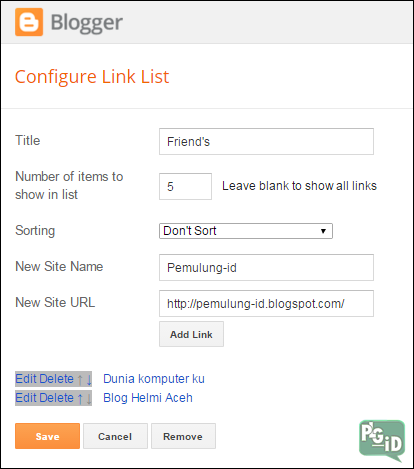
5. It will show the configuration link list, fill in the appropriate command

How to add links in blog friend

6. If you have click Save to save it
7. Take a look at your blog, there will appear your friends blog link you passed


Adding links anther pemblogger can happen when both parties have mutually agreed blog and do so voluntarily. How easy is not enough, hopefully we can add insight about the blog buddy, and his Fiture Fiture. Good luck and good luck
Read-More → How to add links in blog friend

Tuesday, March 1, 2016

The latest news, Microsoft Lumia 650 has come with Windows 10

The latest news, Microsoft Lumia 650 has come with Windows 10

Microsoft has to present the latest version of a semartphone "Microsoft Lumia 650" to upgrade summarized with the windows 10 on it. With the support Windows 10 as a system device oprasinya create performance and premium design-lumia 650 is very suitable to use as a smart companion for your business.

Built for business with powerful features built-in security and easy setup of Office 3652, Lumia 650 with Windows 10 works seamlessly with your company's Microsoft IT platform. So whether you are chosing to work or managing an IT department, you get full integration with Microsoft applications and services that make you productive, connected and ready for anything.

In view of the physical side and tecnology you will be able to enjoy the experience of watching a sharp and bright, even in direct sunlight, with a 5-inch OLED screen is super sharp HD seated in the elegant, metal frame diamond - cut precision - crafted. With its lightweight design, slim 0.27-inch profile, and 16GB of internal memory3, Lumia 650 has a perfect combination of premium performance and performance-based features.

Not only were the other facilities such as the latest mobile versions of Word, PowerPoint, Excel, Outlook and OneNote built and fully optimized for touchscreens.4 your Microsoft applications and services are synchronized in Windows 10 devices via onedrive, so that all the photos and important documents which is always with you when you need them. So how would you be interested to propose new output microsoft

The latest news, Microsoft Lumia 650 has come with Windows 10

This information is gathered from NPU reveals that this phone is expected to go on sale between March 2nd to mid-March at a price of Rs 14 999 or about USD 2.9 million


To see more details about the base microsoft lumia 650 I have provided a list of some of the details about the latest innovations from Microsoft


Operating system :
Windows 10

Processor :
Qualcomm Snapdragon 212, Quad-core, 1.3GHz

Memory :

RAM: 1GB
Mass memory: 16GB
Removable microSD up to 200GB (sold separately)

Networks :
GSM: 850 MHz, 900 MHz, 1800 MHz, 1900 MHz
WCDMA: Band 1 (2100 MHz), Band 5 (850 MHz), Band 8 (900 MHz)
LTE: 150 Mbps (Cat 4)

Connectivity :
SIM: Nano SIM
Charging connector: Micro-USB
AV connectors: 3.5 mm stereo headset connector
System connectors: Micro-USB-B
Wi-Fi: Wi-Fi call, WLAN IEEE 802.11 b/g/n
Wi-Fi hotspot: Up to 8 Wi-Fi-enabled devices
USB: USB 2.0
Bluetooth 4.1
Bluetooth profiles: Advanced Audio Distribution Profile (A2DP) 1.2, Audio/Video Remote Control Profile (AVRCP) 1.3, Generic Attribute Profile (GATT), Hands-Free Profile (HFP) 1.6, HID over GATT profile (HOGP) 1.0, Human Interface Device Profile (HID), Message Access Profile (MAP)

Display and user interface :
4.97 inch, ClearBlack display technology, OLED
Resolution: HD720 (1280 x 720), 297ppi

Display features: Automatic brightness control, Corning Gorilla Glass 3, easy to clean, Lumia Colour profile, orientation sensor, sunlight readability enhancements, wide viewing angle

Touch screen technology: Capacitive multipoint-touch 1.1, Object Push Profile (OPP) 1.1, Personal Area Network Profile (PAN) 1.0, Phone Book Access Profile (PBAP) 1.1
NFC: Connecting, Pairing, Sharing, Tagging, Secure NFC for payment
Location technologies: A-BeiDou, A-GLONASS, A-GPS, Cellular and Wi-Fi network positioning
Sensors: Accelerometer, Ambient light, Proximity
Other user interface features: Cortana, glance screen, tactile feedback, vibrating alerts, voice commands

Keys and input methods :
User input: Touch
Operating keys: Power/lock key, volume keys

Battery :
BV-T3G, 2000mAh, replaceable
Talk time 4G: Up to 16 hours

Global applications and software :
Productivity features: Calendar, interactive notifications, pin information to Start screen, reminders, voice dictation in edit fields, Word Flow keyboard

Business apps: Adobe Reader free download, Company Hub for enterprise applications, Microsoft Outlook, Office apps, Integrated OneDrive for Business, OneDrive storage for documents and notes, Skype for Business

Social apps: Facebook, Flickr, Foursquare, LINE, LinkedIn, OneDrive, Sina Weibo, Skype, Twitter, WeChat, WhatsApp, YouTube
Maps: Free global voice guided turn-by-turn drive navigation, free maps, map views: satellite - street map - public transport, offline maps and navigation, online and offline favourites, pin places to Start screen, public transport and drive directions, real-time traffic information, reveal the surrounding places, speed limit information, turn-by-turn walk directions, Where is my car - feature


Communications :
Call types: Audio call, conference call, HD voice call, Skype video call, Skype voice call
Call management features: Call forwarding, call history, call recording, call waiting, integrated hands-free speakers, seamless upgrade to video call, speed dial, voicemail
Email clients: Gmail, IBM Notes Traveler, MS Exchange Active Sync, Outlook / Office 365 / Exchange, Windows Live / Hotmail / Outlook.com, Yahoo! Mail
Supported instant messaging and services: LINE, MySpace, Skype IM, Twitter, Viber, WeChat, WhatsApp, Yahoo! Messenger
Ringtones: Downloadable ringtones, MP3 ringtones

Device security :
Application certification, application sandboxing, backup and restore via Internet, browser integrated anti-phishing, consumer VPN, device lock, device lock passcode, PIN code, regular signed firmware updates, remote device lock via Internet, remote device wipe via Internet, secure boot, signed OS, track and protect via Internet

Camera :
Main camera: 8MP, autofocus
Digital zoom: 2x
Sensor size: ¼ inch
F-number/aperture: f/2.2
Focal length: 28mm
Flash type: LED flash
Camera features: Auto and manual exposure, auto and manual white balance, automatic photo upload to web services, face recognition, full resolution photo and video upload, full screen view finder, Geotagging, landscape orientation, touch focus

Front-facing camera :
F-number/aperture: f/2.2
Features: Still image capture, Video call, Video recording
Front camera video resolution: 720p (HD, 1920 x 1080)

Music and audio :
Audio playback file formats: 3G2, 3GP, AAC, AMR, ASF, M4A, MKV, MP3, MP4, WMA
Audio playback features: Album graphics display in music player, audio streaming, cloud music offline playback, cloud music playback, media player, music player, podcasts
Radio features: FM radio, Internet radio

Video :
Main camera video resolution: 720p (HD, 1280 x 720)
Camera video frame rate: 30fps
Video zoom: 2x
Video recording features: Continuous autofocus, video light, video zoom
Video recording formats: MP4/H.264

Video playback :
Frame rate: 30fps
Video playback codecs: H.263, H.265/HEVC, H.264/AVC, MPEG-4, VC-1, Windows video
Video playback file formats: 3G2, 3GP, AVI, M4V, Matroska (MKV), MOV, MP4, WMV
Video playback features: Subtitles for video playback, video editing

Design details
Exchangeable back cover, solid aluminum frame

Dimensions :
5.59 x 2.79 x .27 in (142 x 70.9 x 6.9 mm) (H x W x T)

Weight :
4.30 ounces (122 grams)


Reflink by : Microsoft.com

Read-More → The latest news, Microsoft Lumia 650 has come with Windows 10

Monday, February 29, 2016

2 Ways To Clear The Cache On The Laptop Until it is Clean

 2 Ways To Clear The Cache On The Laptop Until it is Clean

Cache is a file trash our activity in the laptop , this file could be parasitical if not in the clear . Because it can be cached files can accumulate and become a parasite that can make your laptop becomes slow and so forth .


These cache files are stored in the C: \ drive on your laptop right on recent system places , you can see it on your windows explorer . there are all kinds of your daily activities inside the laptop , just imagine if it was not in the clear cache might accumulate and make us punuh storage drive . Keith again kalai these caches contain viruses that can damage the system on your laptop . The following two ways to clean cache on the laptop


First Step
  1. Press WIN + R
  2. Laluk type in "Recent " without quotes and enter Recent command is used to display all the cache on the laptop
  3. Select All by pressing CTRL + A right click select Delete


How to-2 use the app Ccleaner
  1. Open the application Ccleaner
  2. Then click Analyze , Wait until the process is complete
  3. If you have finished click Run cleaner to begin the process of elimination of junk files that exist on your laptop , wait until the process is completed
  4. Repeat the process until the capacity of the Run Cleaner changed to 0 bytes removed


Perform cleaning periodically and regularly, at least 1 week up to 1 month. It is included in the activities shall be conducted on the laptop because the laptop is still relatively care as well .


Thank you for visiting PEMULUNG-ID


Acer  |   Samsung   |   Asus  |  


Read-More → 2 Ways To Clear The Cache On The Laptop Until it is Clean

Sunday, February 28, 2016

Want to keep your laptop nimble , let 's consider the following tips

Want to keep your laptop nimble , let 's consider the following tips


Laptop slow , it is because of his lack of medical treatment and attention to your laptop , you try to watch how you use it may be arbitrary and does not care about what will happen to your laptop . Slow that is for sure if you use it carelessly . For that you may need to try a few of these tips


1. use the default Windows theme display only

felt lighter, as most of the default Windows theme is not only made your SO be slow, it's because the theme you are using not compatible with the state of your laptop 

2. on the theme to make it more agile use the classic theme

default classic theme of windows as sipel Temes has a mode that all of his relatively classical and light wear on your laptop 

3. not too much to ask shortcut on the desktop display
too many shortcuts also affect the speed of the windows appear when first turned on, because the windows system requires more time to neutralize all of the applications on your Windows display 


use the application as needed, for example, frequently use applications or you must use on your laptop in their daily lives. because too many applications installed on your laptop and rarely in use application that will actually slow down the performance of your laptop

5. clear the cache every 1 week

file cache is trash our activity in the laptop, if let it accumulate then it will be bad for the health of your laptop. This cache is parasitic if it is not cleaned periodically, because it can take space on your operating system. 

6. remove unnecessary files from your drives
These actions are taken so that your drive is not full and make your laptop experience low-speed, full of his drive is one factor that can make your laptop into a low speed 

7. The use antivirus that is lightweight and does not block for laptop systems

Antivirus today many who overload the operating system on our laptops, because too sensitive to viral activity that goes on our laptops instead will be bad, intends to maintain but could be even remove all existing registry on System oprasi on our laptop, laptop be slow initially, the impact of the worst impact is that the windows could be crass and error 

8. reduce the activity too often playing games on laptop
with a laptop you can reduce the time to do a little bit on the system refres system, so it can be re-fresh your laptop system deh 

9. use applications that do not take too much of your drive space

This apliaski normally would be too much to take over the system on your laptop one on the storage system, because as I said earlier that the drive is full is one cause of the laptop to be slow 

10. do regular maintenance and regular course

for this one must be done because you are doing maintenance on a regular basis can make your laptop into a more manicured and comfortable in use course


well that's a few tips that I can share to all my friends , the tips above are also I often do on the laptop and my home computer , I'll certainly durable and long lasting . Behind a great laptop that contained accurate treatment are not you , good luck and hopefully useful .


Thank you for visiting our PEMULUNG-ID
Read-More → Want to keep your laptop nimble , let 's consider the following tips